
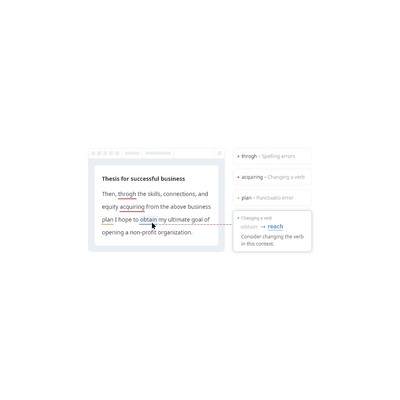
About Wordvice AI
Wordvice AI is an online writing assistant that caters specifically to the needs of students and professionals alike, aiming to elevate the quality of academic papers and professional content. What I found most intriguing about it is its comprehensive suite of features: a grammar checker, text editor, paraphraser, and translation capabilities. These tools work in conjunction to help users craft polished and coherent written work. The user-friendly interface makes it approachable for anyone, whether you’re a seasoned researcher or someone trying to draft a business email without sounding like a robot. The free grammar checking service upon registration is a nice touch that immediately opens the door for users to experience its benefits without any financial commitment.
One of the standout features is the paraphrasing tool, which can help you reword complex sentences while maintaining the original meaning. This is particularly useful for non-native English speakers or anyone who struggles with finding the right words. However, while the paraphraser does a commendable job, there are times when it feels a bit awkward—some phrases come out sounding more convoluted than necessary. This could potentially frustrate users who are looking for smooth and natural language flow. Additionally, the translation feature is helpful for those who need to communicate in multiple languages, although it might not be as nuanced as a dedicated translation service.
In terms of pricing, Wordvice AI operates on a freemium model, which means you can access basic features without spending a penny. However, to unlock the full potential of the tool, you may find yourself needing to opt for a premium plan, which isn’t specified on their website. This lack of transparency can be a bit annoying, especially if you're trying to budget for writing tools. Nevertheless, I think it’s worth considering for students and professionals who need to produce high-quality written content on a regular basis, provided they’re willing to explore the premium options later.
In my experience, Wordvice AI shines brightest for academic writing, where the stakes are high, and clarity is crucial. It’s perfect for students who are pulling all-nighters to finish their dissertations and need a reliable assistant to catch those pesky grammatical errors. However, if you’re someone who’s looking for a more general writing assistant for creative or casual writing, you may find it somewhat limited. Overall, Wordvice AI stands out in the crowded field of writing assistants, but it’s not without its quirks and limitations that users should be aware of before diving in.
Our Review
Verified 11 May 2026Reviewed by Delv Editorial, Delv Team
When I first stumbled upon Wordvice AI, I thought, 'Oh great, another writing assistant.' But after giving it a proper test drive, I realised it’s actually quite a solid tool, especially for those entrenched in the world of academia or professional writing. From grammar checks to paraphrasing, it covers a broad spectrum of writing needs, all while being user-friendly. The grammar checker, in particular, is a strong point—it's quick to highlight errors, which is a lifesaver for anyone who’s ever pulled an all-nighter trying to get a paper done.
What really impressed me was the paraphrasing feature. It’s like having a writing coach who gives you suggestions on how to phrase things better. I found it especially useful when I was trying to condense complex ideas into more digestible sentences for a research paper. However, I did notice some instances where the suggestions came out sounding a bit clunky. For example, in one case, a perfectly good sentence was transformed into something that seemed overly complicated. This can be a bit frustrating when you’re aiming for clarity, but it’s something to keep in mind.
The translation feature is another neat addition, particularly helpful for those working in multilingual environments. I used it to translate some business correspondence, and while it got the job done, I felt that some subtleties were lost in translation. This isn't a dealbreaker, but if you're working with specialised language, you might want to cross-check with a dedicated translation tool.
Now, let’s talk about pricing. Wordvice AI operates on a freemium model, which is great for those who want to dip their toes in without spending a dime. However, I found the lack of clear pricing for premium features a bit irritating. It’s tough to gauge whether the full suite is worth investing in without knowing the cost upfront. This adds a layer of uncertainty that could put some users off.
When comparing it to other writing assistants, like Grammarly, I found Grammarly to be more comprehensive for general writing needs. Wordvice AI, however, really shines in academic contexts. If you're a student or a researcher, this tool might just become your new best friend. But if you're looking for something for creative writing, you might want to explore other options.
In conclusion, I think Wordvice AI is a solid option for anyone needing help with formal writing. It offers useful tools that can genuinely improve the quality of your work, although it does have its quirks. If you’re a student or professional looking to enhance your writing without breaking the bank, give it a shot. Just be prepared to double-check some of the paraphrasing suggestions and keep an eye out for the premium pricing details.
Getting started with Wordvice AI
In this guide, you'll learn how to use Wordvice AI to enhance your academic papers and professional content. You'll be able to check grammar, paraphrase text, and translate content effectively in just a few minutes.
Step 1: Sign up and set up
Step 2: Your first writing task
Step 3: Get better results
Pro tip
Take advantage of the keyboard shortcuts available in the editor. For example, use Ctrl + Z to undo any changes quickly, which can save you time when editing.
Common mistake to avoid
Avoid submitting your work without thoroughly checking the suggestions provided by the grammar checker. Some corrections might not fit your intended meaning, so always review them carefully.
The Verdict
Wordvice AI is worth considering for students and professionals who need a reliable writing assistant for academic and formal content. While it has some quirks like awkward paraphrasing and unclear pricing for premium features, its free tools can significantly improve written communication. If you're looking for a general writing assistant, however, you might want to explore alternatives.
Best For
- Students working on academic papers
- Researchers drafting scholarly articles
- Professionals writing business communications
- Non-native English speakers needing language assistance
- Anyone looking to improve their writing clarity and quality
At a Glance
Wordvice AI is a free writing assistant tailored for academic and professional content, offering tools like grammar checking, paraphrasing, and translation. Its user-friendly interface and focus on clarity make it ideal for students and professionals, though some features may feel clunky at times.
Strengths
- +The free grammar checking service allows users to quickly enhance their writing without any initial investment, making it accessible for students or anyone on a budget.
- +The paraphrasing tool helps users reword complex sentences effectively, which is particularly useful for those who may struggle with finding the right phrasing.
- +The user-friendly interface makes it easy to navigate, so both tech-savvy individuals and those less familiar with digital tools can use it without frustration.
- +The translation feature is a handy addition for multilingual users, making it easier to craft documents in different languages without needing a separate tool.
- +The tool's focus on academic writing ensures that it helps maintain clarity and precision, which is essential for students and professionals looking to communicate effectively.
Limitations
- -The paraphrasing tool can sometimes produce awkward phrases, which could detract from the overall quality of the writing and frustrate users seeking natural language.
- -The website lacks clear pricing details for premium features, making it difficult for users to gauge the full cost before committing to the service.
- -While the grammar checker is beneficial, it doesn’t catch every error, particularly more nuanced grammatical issues that might arise in complex sentences.
- -The translation feature, while useful, may not be as refined as dedicated translation software, leading to potential inaccuracies in technical or specialised language.
- -The tool’s focus on academic content may limit its usefulness for users seeking assistance with creative writing or more casual styles.
Use Cases
- -Students writing dissertations who need a reliable assistant to catch grammatical errors and improve clarity in their arguments.
- -Researchers drafting scholarly articles who want to ensure their writing meets academic standards and flows logically.
- -Professionals composing business emails who require assistance in maintaining a formal tone while avoiding common grammatical pitfalls.
- -Non-native English speakers looking for help in rephrasing complex sentences to sound more fluent and natural.
- -Writers in need of a quick translation for documents when communicating with international colleagues.







