
About AgencyAnalytics
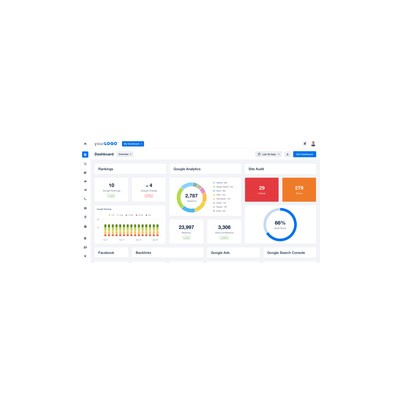
AgencyAnalytics positions itself as an essential tool for marketing agencies and freelancers who are tired of the tedious task of compiling reports from various platforms. Its ability to pull in data from over 80 different marketing platforms means you can track everything from SEO performance to PPC campaigns in one cohesive dashboard. This is a lifesaver for anyone who’s ever spent hours juggling spreadsheets and trying to make sense of disparate metrics. The integration options are impressive, allowing you to connect with popular platforms like Google Analytics, Facebook Ads, and Mailchimp, among others. What’s more, the user interface is designed with clarity in mind, making it relatively easy to navigate through the various features and data points.
One of the standout features for me is the white-label capability. This allows agencies to customise reports to align with their brand, which is a must-have for any agency that wants to maintain a professional image when presenting to clients. You can easily add your logo and tweak colours to match your branding, making it look like a bespoke report rather than something cobbled together. However, while this is a great feature, I found that the customisation options could be a bit more extensive; for instance, you can't change the layout of the dashboard as freely as I would like.
Now, let’s talk about pricing. AgencyAnalytics operates on a tiered pricing model, starting with a free trial that allows you to explore the basics. However, if you want to access advanced features like call tracking or additional integrations, you’ll need to upgrade to one of their paid plans. The pricing can get a bit steep for smaller agencies or freelancers, especially if you’re just starting out and working with a limited number of clients. It feels like a classic case of ‘you get what you pay for’, and while the tool is undoubtedly powerful, it may not be the most budget-friendly option for everyone.
In my opinion, AgencyAnalytics is best suited for larger agencies that have a steady flow of clients and can justify the investment in a comprehensive reporting tool. If you’re a freelancer or a small agency with a handful of clients, the free tier might be enough, but you may feel limited by the features. Overall, while the tool has its shortcomings, it undeniably streamlines reporting processes and provides valuable insights that can help agencies make data-driven decisions.
Our Review
Verified 11 May 2026Reviewed by Delv Editorial, Delv Team
So, I recently got my hands on AgencyAnalytics, and I have to say, it was a bit of a revelation for my reporting woes. As someone who’s spent far too many late nights battling with Excel spreadsheets to compile client reports, having a tool that pulls data from over 80 different marketing platforms into one dashboard was like finding the Holy Grail. I could easily track everything from SEO performance to PPC campaigns without having to flip between tabs and juggle different metrics.
The user interface is surprisingly intuitive, which I appreciated. I didn’t have to spend ages figuring out where everything was; the layout is clean and user-friendly. And let’s not forget the white-label feature. This is a biggie for agencies; you can easily slap your logo on the reports and tweak colours to match your branding. It’s a simple touch, but it makes a huge difference when you’re presenting to clients. However, I did wish for a bit more flexibility in customising the layout of the dashboard. Sometimes I wanted to rearrange certain elements, and that wasn’t as straightforward as I’d hoped.
Let’s talk about the pricing, shall we? AgencyAnalytics offers a free trial, which is great for dipping your toes in, but if you really want to take advantage of all the features, you’re going to have to fork out some cash. The paid plans can get a bit pricey, particularly if you’re a small agency or freelancer just starting. I know that you get what you pay for, but it still stings to see those numbers climb when you’re trying to stick to a budget.
In comparison to competitors like Google Data Studio, AgencyAnalytics definitely offers more in terms of integrations and ease of use, but Data Studio is free and offers a good amount of customisation. If you’re on a tight budget, it’s worth considering. But if you’re looking for a comprehensive and professional tool that takes the headache out of reporting, AgencyAnalytics is a solid choice. In my experience, it’s perfect for larger agencies with a steady stream of clients. For freelancers or smaller agencies, the free tier might suffice, but you may find yourself itching for more features sooner than you think.
So, if you’re drowning in data and need a lifebuoy, AgencyAnalytics could be just what you need. Just be prepared to spend a bit if you want to unlock its full potential.
Getting started with AgencyAnalytics
After reading this guide, you'll be able to set up your AgencyAnalytics account and create your first marketing dashboard, pulling data from various platforms to streamline your reporting process.
Step 1: Sign up and set up
Step 2: Your first dashboard
Step 3: Get better results
Pro tip
Use the “Custom Metrics” feature to create tailored data views. This allows you to track specific KPIs that matter most to your business or clients, saving you time on manual adjustments.
Common mistake to avoid
Don’t skip the account connection process for each data source. If you miss this step, your dashboard will not display any data, leading to confusion and wasted time trying to troubleshoot missing information. Always ensure you’ve successfully connected all relevant accounts.
The Verdict
AgencyAnalytics is a solid choice for marketing agencies that need to simplify their reporting processes and impress clients with professional-looking dashboards. However, smaller agencies and freelancers might find the pricing a bit steep for what they need. If you’re a larger agency ready to invest in a comprehensive reporting tool, go for it; otherwise, you might want to explore other, more budget-friendly options.
Best For
- Marketing agencies managing multiple clients who need efficient reporting tools.
- Freelancers who want to present professional reports to their clients.
- Digital marketing teams requiring real-time insights into their campaigns.
- Agencies looking for seamless integration across various marketing platforms.
- Businesses needing to consolidate data from multiple sources for reporting.
At a Glance
AgencyAnalytics is a reporting powerhouse for marketing agencies and freelancers, pulling data from over 80 platforms into one cohesive dashboard. Its white-label capabilities allow agencies to present customised reports, making it both functional and professional.
Strengths
- +The integration with over 80 marketing platforms is a massive time-saver, pulling all your data into one dashboard instead of juggling multiple spreadsheets.
- +The user-friendly interface makes it easy to navigate through various metrics, which is crucial for busy marketers looking to quickly understand their data.
- +The white-label feature allows agencies to customise reports, ensuring branding consistency that impresses clients and enhances professionalism.
- +Real-time data updates mean you can provide clients with the most current insights, which is essential for making timely decisions in fast-paced marketing environments.
- +The ability to set up automated reports helps eliminate the manual labour of compiling data, freeing up time for marketers to focus on strategy and execution.
Limitations
- -The customisation options for reports, while helpful, feel somewhat limited; you can't easily rearrange the dashboard elements to suit your specific needs.
- -The pricing can be a bit overwhelming for smaller agencies or freelancers, particularly when you want access to advanced features like call tracking.
- -The customer support response times can vary; I found myself waiting longer than expected for answers to some basic queries.
- -The mobile experience is not as polished as I hoped; it lacks some features available on the desktop version, which can be frustrating when you're on the go.
- -Some integrations can be a bit buggy, especially with less common platforms, which could lead to data discrepancies.
Use Cases
- -Marketing agencies that manage multiple client accounts and need to generate comprehensive reports without spending hours on manual data entry.
- -Freelancers who want to provide clients with professional, branded reports that reflect their marketing performance.
- -Agencies looking to track PPC campaigns across various platforms and consolidate reporting into one clear dashboard.
- -Businesses that require real-time insights to make quick decisions on marketing strategies and tactics.
- -Digital marketing teams who need to monitor SEO performance and social media engagement in one place.







